The Fire TV Cube is Amazon’s flagship streaming device, designed to bring a seamless entertainment experience into your living room. Combining the power of a streaming media player with hands-free Alexa voice control, this device offers a unique blend of convenience, functionality, and speed. Whether you are a binge-watcher, a tech enthusiast, or someone who wants to simplify your smart home, the Fire TV Cube promises to be a game-changer.
In this article, we will explore everything you need to know about the Fire TV Cube, from its features and setup process to its benefits, comparisons, and troubleshooting tips.
What is the Fire TV Cube?
The Fire TV Cube is more than just a streaming device. Unlike the regular Fire TV Stick or Fire TV Stick 4K, the Cube comes with an array of advanced features:
- Hands-Free Alexa Integration: Unlike other Fire TV devices that require a remote, the Cube responds to voice commands directly, allowing you to search for content, control playback, and even manage smart home devices without touching a remote.
- 4K Ultra HD Streaming: Enjoy your favorite movies and shows in stunning 4K resolution with HDR10+ and Dolby Vision support.
- Dolby Atmos Audio: Experience cinematic sound quality when paired with compatible audio devices.
- Ethernet Support: Unlike the Stick, Fire TV Cube can be connected via Ethernet using an optional adapter, ensuring stable streaming.
- Smart Home Hub Capabilities: Beyond streaming, the Fire TV Cube can control compatible smart home devices, such as lights, cameras, and thermostats, directly with your voice.
Fire TV Cube Features
Amazon has packed the Fire TV Cube with features that elevate it above standard streaming devices. Here are the key highlights:
1. Hands-Free Alexa Voice Control
One of the most impressive aspects of the Fire TV Cube is its ability to respond to voice commands without needing a remote. Using the far-field voice recognition system, the Cube can hear commands from across the room, even while the TV is playing loudly. You can ask Alexa to:
- Play movies or TV shows
- Search for content by title, actor, or genre
- Adjust volume or pause playback
- Turn on/off the TV and other connected devices
- Control smart home devices like lights and thermostats
This hands-free functionality makes the Fire TV Cube one of the most convenient streaming devices available today.
2. Stunning Picture and Audio Quality
Fire TV Cube supports 4K Ultra HD, HDR10, HDR10+, and Dolby Vision. Whether you’re watching the latest Netflix series or streaming live sports, the picture quality is vibrant and detailed. Coupled with Dolby Atmos audio support, the Cube provides a cinematic viewing experience that rivals expensive home theater systems.
3. Smart Home Integration
The Fire TV Cube doubles as a hub for your smart home. It works with Alexa-compatible devices, allowing you to control lights, security cameras, smart plugs, and more directly through voice commands. You can even ask Alexa to show you the feed from your security cameras on the TV screen.
4. Fast Performance
Powered by a hexa-core processor, the Fire TV Cube delivers fast and responsive performance. Switching between apps, searching for content, or opening games is smooth and virtually lag-free. It also has 16 GB of storage for apps and games, and support for external storage through USB drives.
5. Content and App Availability
The Fire TV Cube gives you access to a vast library of streaming apps including Netflix, Amazon Prime Video, Disney+, Hulu, HBO Max, YouTube, and many more. You can also access live TV services like Sling TV or YouTube TV, making it a complete entertainment hub.
How to Set Up Fire TV Cube
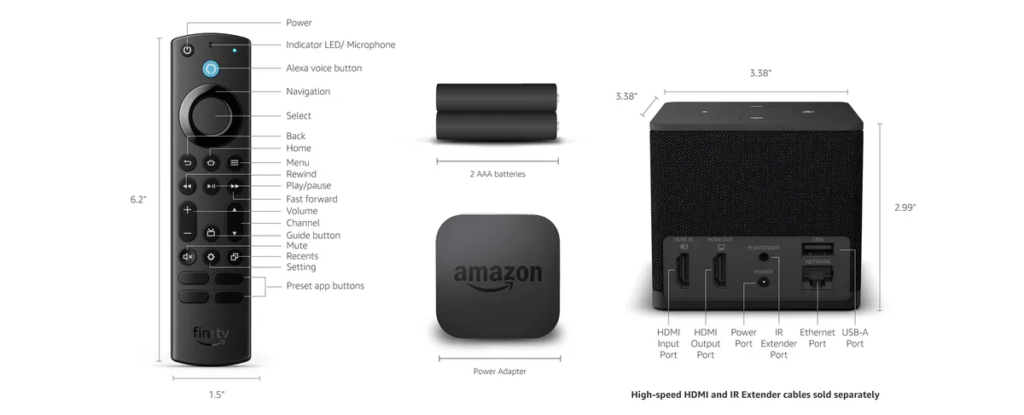
Setting up the Fire TV Cube is straightforward and can be done in a few steps:
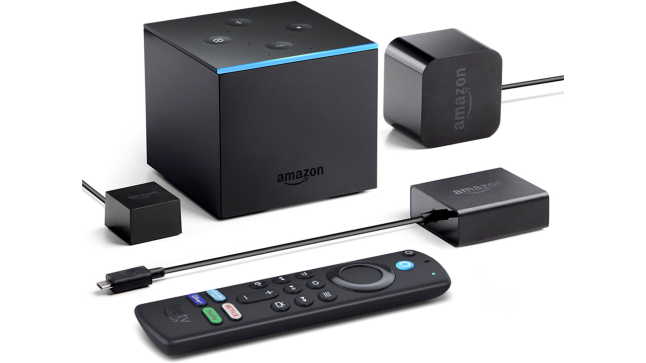
- Connect the Cube to Your TV: Use the included HDMI cable to connect the Cube to your TV.
- Power On: Plug in the power adapter and turn on the Cube.
- Connect to Wi-Fi: Follow on-screen instructions to connect to your Wi-Fi network.
- Sign in to Amazon Account: Sign in with your Amazon account to access apps and content.
- Customize Settings: Set up Alexa voice control, configure smart home devices, and adjust picture/audio settings.
Once set up, the Fire TV Cube is ready to deliver a seamless streaming and smart home experience.
Benefits of Using Fire TV Cube
The Fire TV Cube offers several benefits that make it stand out from other streaming devices:
1. Convenience
Hands-free Alexa control allows you to search, play, and control content without ever picking up the remote.
2. High-Quality Streaming
With 4K UHD, HDR, and Dolby Atmos support, it provides a premium viewing and audio experience.
3. Smart Home Control
It serves as a central hub for your Alexa-compatible smart home devices.
4. Speed and Performance
Its hexa-core processor ensures smooth operation, minimal lag, and quick app launches.
5. Versatility
From streaming video to playing games and controlling smart devices, the Fire TV Cube is an all-in-one solution.
Fire TV Cube vs Fire TV Stick
Many people wonder whether to choose the Fire TV Cube or a Fire TV Stick. Here’s a quick comparison:
| Feature | Fire TV Cube | Fire TV Stick 4K |
|---|---|---|
| Voice Control | Hands-free Alexa | Remote required |
| Processor | Hexa-core | Quad-core |
| Smart Home Hub | Yes | No |
| 4K & HDR Support | Yes | Yes |
| Audio | Dolby Atmos | Dolby Atmos |
| Price | Higher | Lower |
While the Stick is more affordable, the Fire TV Cube provides hands-free control, faster performance, and smart home integration, making it ideal for those who want a premium experience.
Troubleshooting Fire TV Cube
Even the best devices may encounter issues. Here are some common problems and solutions:
1. Fire TV Cube Not Responding to Alexa
- Ensure the microphone is not muted.
- Check Wi-Fi connection.
- Restart the device.
2. Streaming Buffering Issues
- Use Ethernet for a stable connection.
- Reduce the number of devices connected to the network.
- Restart your router and Fire TV Cube.
3. HDMI Issues
- Ensure the HDMI cable is securely connected.
- Try a different HDMI port on your TV.
- Use the included HDMI extender for better performance.
Fire TV Cube Accessories
Enhance your experience with these accessories:
- Ethernet Adapter: For stable wired internet connection.
- HDMI Extender: Helps fit the Cube behind TVs with tight spaces.
- Voice Remote: For traditional remote control when needed.
- External Storage: Expand storage for games and apps.
Why Fire TV Cube is Worth It
The Fire TV Cube is more than just a streaming device; it’s an all-in-one entertainment and smart home hub. Its hands-free Alexa integration, 4K UHD support, Dolby Atmos audio, and smart home capabilities make it a top choice for tech-savvy users and anyone looking to simplify their home entertainment setup.
Whether you are streaming movies, watching live TV, playing games, or controlling smart devices, the Fire TV Cube offers convenience, speed, and versatility that is hard to beat.
READ ABOUT:
DJI Osmo Action 5 Pro: The Ultimate Action Camera for Adventure Enthusiasts
Conclusion
The Fire TV Cube is a premium streaming device that combines entertainment, smart home control, and voice-activated convenience in one sleek package. Its hands-free Alexa functionality, 4K UHD and HDR support, Dolby Atmos audio, and smart home integration make it a must-have for anyone looking to upgrade their living room experience.
With the Fire TV Cube, you can enjoy faster performance, smoother streaming, and a smarter home environment—all controlled effortlessly with your voice. Whether you are a casual viewer or a tech enthusiast, the Fire TV Cube offers the ultimate streaming experience.
FAQ: Fire TV Cube
Q1: Can Fire TV Cube control all smart home devices?
A: It works with Alexa-compatible devices, including lights, cameras, thermostats, and more.
Q2: Does Fire TV Cube support 4K and HDR?
A: Yes, it supports 4K Ultra HD, HDR10, HDR10+, and Dolby Vision.
Q3: Do I need the remote to use Fire TV Cube?
A: No, you can use hands-free Alexa voice commands for most functions.
Q4: Is Fire TV Cube better than Fire TV Stick?
A: If you want hands-free voice control, faster performance, and smart home integration, the Cube is better.
Q5: Can I connect Fire TV Cube via Ethernet?
A: Yes, with the optional Ethernet adapter for a stable internet connection.