Slack, one of the world’s most popular team collaboration platforms, is rapidly transforming with the integration of artificial intelligence. Today, Slack is not just a messaging tool — it’s becoming a powerful AI-driven workspace that helps teams communicate smarter, automate tasks, and make faster decisions.
This article explores the latest Slack AI news today, explaining the key updates, features, and what they mean for businesses and employees in 2026.
What Is Slack AI?
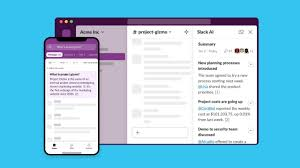
Slack AI refers to artificial intelligence tools built into Slack that make work more efficient. From AI chat assistants to smart search and automated workflows, these tools are designed to understand the context of your workspace. They can access your messages, files, and channels to provide personalized and actionable responses, unlike generic AI tools that work in isolation.
Slack AI aims to streamline work, reduce repetitive tasks, and give teams the information they need without switching apps.
Slackbot Becomes a Smart AI Assistant
One of the biggest changes in Slack AI today is the transformation of Slackbot. Previously a basic helper bot, Slackbot is now a full-featured AI assistant that can handle complex tasks.
Key Features of the New Slackbot
- Context-Aware Responses: Slackbot can analyze conversations, files, and projects to give accurate answers.
- Task Automation: It can draft documents, summarize discussions, create meeting agendas, and organize tasks.
- Scheduling Help: Slackbot can manage calendars, schedule meetings, and suggest priority actions.
- Security & Privacy: Slackbot only accesses information users are permitted to see, keeping sensitive data secure.
The new Slackbot is gradually rolling out to Business+ and Enterprise+ users, making AI accessible for professional teams.
AI Agents and the Agentic Workspace
Slack is moving toward an “agentic enterprise”, where AI agents help employees take action, not just provide information.
How AI Agents Work
- Automated Workflows: AI agents can follow instructions to perform tasks like updating project trackers, sending reminders, or generating reports.
- Customizable Agents: Developers can build AI agents tailored to specific team needs, expanding the capabilities of Slack.
- Data-Driven Decisions: AI agents can integrate with company data and analytics to provide insights directly in Slack channels.
This approach transforms Slack into a central hub where AI and human work converge seamlessly.
New Tools for Developers
Slack’s AI ecosystem now includes tools for developers to create smarter integrations.
- Context-Aware APIs: Developers can access real-time workspace data securely to build AI features.
- Model Context Protocol: Ensures AI apps interpret Slack data accurately while maintaining security and privacy.
- Third-Party Integration: Developers can embed AI capabilities directly into Slack, improving workflows and reducing manual work.
These tools make Slack a robust platform for building advanced AI-powered applications.
Other Notable Slack AI Features
ChatGPT Integration
Slack supports AI apps similar to ChatGPT, allowing users to summarize threads, draft messages, and perform searches in natural language.
AI-Powered Enterprise Search
Users can search across Slack and connected apps using AI, finding relevant conversations, files, and project updates quickly.
Business Intelligence and Insights
AI tools can analyze workspace activity and provide dashboards, helping teams make data-driven decisions without leaving Slack.
Benefits of Slack AI
Integrating AI into Slack brings numerous advantages:
- Saves Time: Automates repetitive tasks like summarizing messages and organizing files.
- Boosts Productivity: Helps teams stay aligned, find information quickly, and reduce context-switching.
- Improves Decision-Making: Provides actionable insights from integrated data sources.
- Enhances Collaboration: AI-assisted workflows enable teams to work smarter and faster together.
Challenges and Considerations
While Slack AI offers many benefits, there are challenges to consider:
- Learning Curve: Some users may need time to adapt to AI features.
- Privacy Concerns: AI uses workspace data, so companies need clear policies and security settings.
- Cost: Advanced AI features are mainly available in premium plans, which may not suit all organizations.
- Mixed User Feedback: Some users find AI helpful, while others may see it as intrusive or unnecessary.
Understanding these challenges helps teams implement AI effectively without disrupting workflows.
READ ABOUT:
Pixel Watch 4: Expected Features, Design, Price, Release Date, and Everything We Know
Conclusion: Slack AI News Today
Slack AI is transforming the way teams collaborate. With intelligent Slackbot updates, AI agents, advanced developer tools, and integrated business insights, Slack is no longer just a chat app — it’s a workspace intelligence platform.
For businesses, the key takeaway is clear: AI in Slack is designed to save time, streamline workflows, and empower teams to make faster, smarter decisions. Keeping up with Slack AI news today ensures organizations can leverage these tools to stay competitive in the evolving workplace.
Frequently Asked Questions (FAQ) about Slack AI
1. What is Slack AI?
Slack AI is a set of artificial intelligence tools integrated into Slack to help teams work smarter. It includes features like AI assistants, task automation, chat summaries, and intelligent search.
2. How does Slackbot use AI?
Slackbot now functions as a context-aware AI assistant. It can summarize conversations, draft messages, organize tasks, schedule meetings, and provide actionable insights based on your workspace data.
3. Can Slack AI help with productivity?
Yes. Slack AI automates repetitive tasks, provides smart suggestions, and integrates data from connected apps, helping teams save time and collaborate more efficiently.
4. Are Slack AI features available for free?
Most advanced Slack AI features are available in Business+ and Enterprise+ plans. Free plans may have limited AI capabilities like basic chat assistance or message summaries.
5. How does Slack AI ensure privacy and security?
Slack AI respects user permissions and workspace settings. It only accesses data that you are authorized to view, ensuring sensitive information remains secure.
6. Can developers create custom AI tools in Slack?
Yes. Slack offers APIs and developer tools that allow building custom AI agents and integrating intelligent workflows directly into Slack workspaces.
7. What are some challenges of using Slack AI?
Challenges include adapting to new AI features, privacy concerns, potential costs for premium plans, and the need to ensure AI suggestions are accurate and relevant.
8. How is Slack AI changing team collaboration?
Slack AI enables teams to automate routine work, get context-aware insights, and make data-driven decisions faster.